怎么清理redis集群的所有數(shù)據(jù)-創(chuàng)新互聯(lián)
小編給大家分享一下怎么清理redis集群的所有數(shù)據(jù),希望大家閱讀完這篇文章之后都有所收獲,下面讓我們一起去探討吧!

1. 背景:生產(chǎn)測試后redis中產(chǎn)生大量數(shù)據(jù)
生產(chǎn)前需要清理reids集群中的數(shù)據(jù)。、
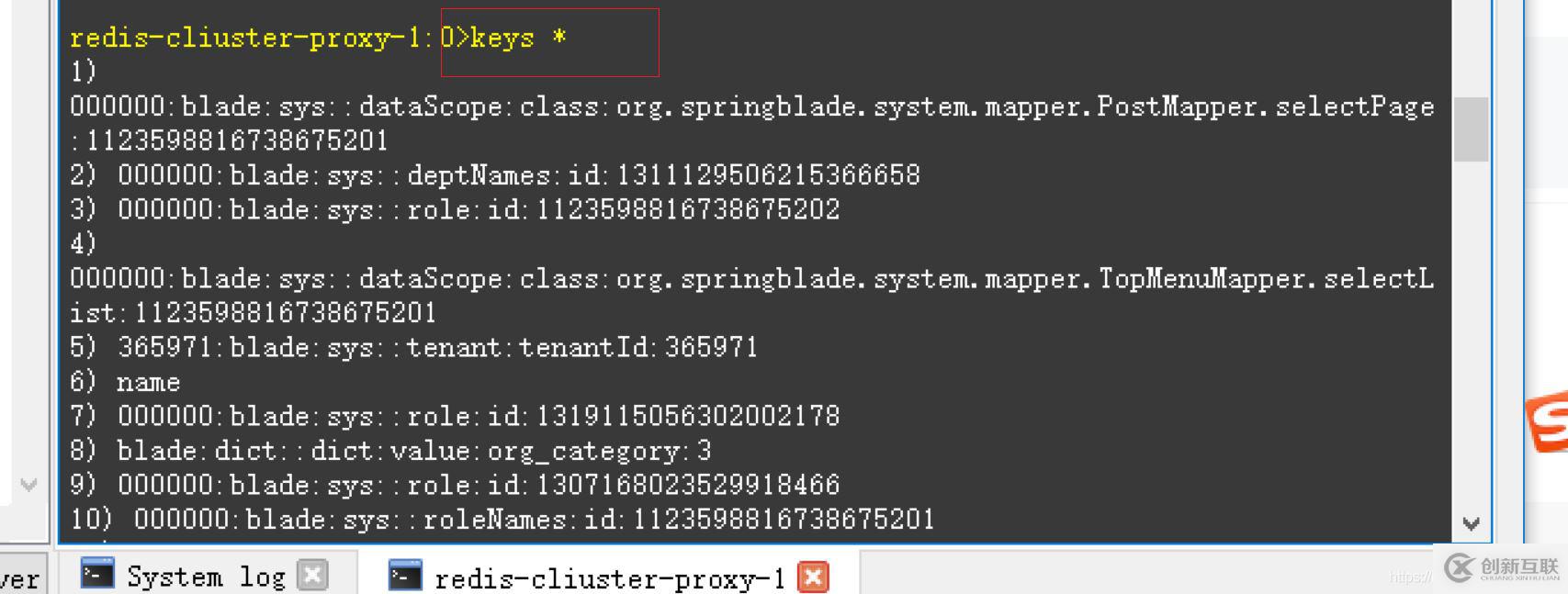
你看有很多key呢:
使用工具

使用命令,查看是否有數(shù)據(jù):
keys *
2. 清理步驟
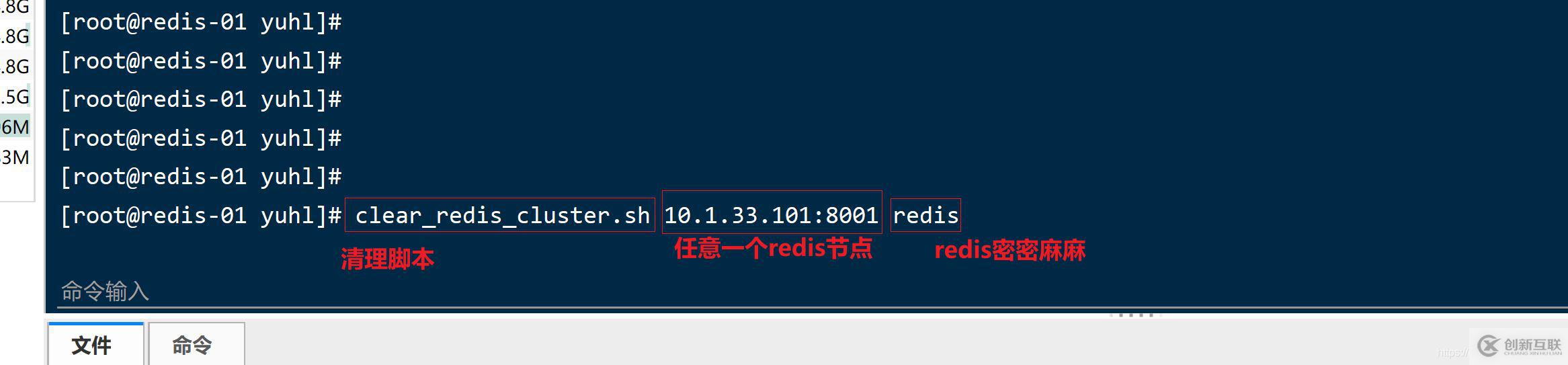
2.1 任意登錄一臺redis機(jī)器
執(zhí)行下面腳本:
clear_redis_cluster.sh 10.1.33.101:8001 redis
執(zhí)行日志如下:

Clearing 10.1.33.112:8028 ...
Background append only file rewriting started
READONLY You can't write against a read only replica.
Clearing 10.1.33.110:8026 ...
Background append only file rewriting started
READONLY You can't write against a read only replica.
Clearing 10.1.33.111:8027 ...
Background append only file rewriting started
READONLY You can't write against a read only replica.
Clearing 10.1.33.107:8007 ...
Background append only file rewriting started
OK
Clearing 10.1.33.108:8024 ...
Background append only file rewriting started
READONLY You can't write against a read only replica.
Clearing 10.1.33.104:8020 ...
Background append only file rewriting started
READONLY You can't write against a read only replica.
Clearing 10.1.33.114:8014 ...
Background append only file rewriting started
OK
Clearing 10.1.33.109:8025 ...
Background append only file rewriting started
READONLY You can't write against a read only replica.
Clearing 10.1.33.105:8005 ...
Background append only file rewriting started
OK
Clearing 10.1.33.108:8008 ...
Background append only file rewriting started
OK
2.2 clear_redis_cluster.sh內(nèi)容
#!/bin/bash
# Writed by yijian on 2018/8/20
# Batch to clear all nodes using FLUSHALL command
# 用來清空一個redis集群中的所有數(shù)據(jù),要求 FLUSHALL 命令可用,
# 如果在 redis.conf 中使用 rename 改名了 FLUSHALL,則不能執(zhí)行本腳本。
# 可帶兩個參數(shù):
# 1)參數(shù)1 集群中的任一可用節(jié)點(diǎn)(必須)
# 2)連接redis的密碼(設(shè)置了密碼才需要)
REDIS_CLI=${REDIS_CLI:-redis-cli}
REDIS_IP=${REDIS_IP:-127.0.0.1}
REDIS_PORT=${REDIS_PORT:-6379}

# 顯示用法函數(shù)
function usage()
{
  echo "Usage: clear_redis_cluster.sh a_redis_node_of_cluster redis_password"
  echo "Example1: clear_redis_cluster.sh '127.0.0.1:6379'"
  echo "Example2: clear_redis_cluster.sh '127.0.0.1:6379' '123456'"
}

# 檢查參數(shù)個數(shù)
if test $# -lt 1 -o $# -gt 2; then
  usage
  exit 1
fi

# 第一個參數(shù)為集群中的節(jié)點(diǎn),
REDIS_NODE="$1"
# 第二個參數(shù)為密碼
REDIS_PASSWORD=""
if test $# -ge 2; then
  REDIS_PASSWORD="$2"
fi

# 取得IP和端口
eval $(echo "$REDIS_NODE" | awk -F[\:] '{ printf("REDIS_IP=%s\nREDIS_PORT=%s\n",$1,$2) }')
if test -z "$REDIS_IP" -o -z "$REDIS_PORT"; then
  echo "Parameter error: \`$REDIS_NODE\`."
  usage
  exit 1
fi

# 確保redis-cli可用
echo "Checking \`redis-cli\` ..."
which "$REDIS_CLI" > /dev/null 2>&1
if test $? -ne 0; then
  echo "Command \`redis-cli\` is not exists or not executable."
  echo "You can set environment variable \`REDIS_CLI\` to point to the redis-cli."
  echo "Example: export REDIS_CLI=/usr/local/bin/redis-cli"
  exit 1
fi

if test -z "$REDIS_PASSWORD"; then
  redis_nodes=`redis-cli -h $REDIS_IP -p $REDIS_PORT cluster nodes | awk -F[\ \:\@] '!/ERR/{ printf("%s:%s\n",$2,$3); }'`
else
  redis_nodes=`redis-cli --no-auth-warning -a "$REDIS_PASSWORD" -h $REDIS_IP -p $REDIS_PORT cluster nodes | awk -F[\ \:\@] '!/ERR/{ printf("%s:%s\n",$2,$3); }'`
fi
if test -z "$redis_nodes"; then
  # Standlone(非集群)
  if test -z "$REDIS_PASSWORD"; then
    $REDIS_CLI -h $REDIS_IP -p $REDIS_PORT FLUSHALL ASYNC
    $REDIS_CLI -h $REDIS_IP -p $REDIS_PORT BGREWRITEAOF
  else
    $REDIS_CLI --no-auth-warning -a "$REDIS_PASSWORD" -h $REDIS_IP -p $REDIS_PORT FLUSHALL ASYNC
    $REDIS_CLI --no-auth-warning -a "$REDIS_PASSWORD" -h $REDIS_IP -p $REDIS_PORT BGREWRITEAOF
  fi
else
  # Cluster(集群)
  for redis_node in $redis_nodes;
  do
    if test ! -z "$redis_node"; then
      eval $(echo "$redis_node" | awk -F[\:] '{ printf("redis_node_ip=%s\nredis_node_port=%s\n",$1,$2) }')

      if test ! -z "$redis_node_ip" -a ! -z "$redis_node_port"; then
        # clear
        echo -e "Clearing \033[1;33m${redis_node_ip}:${redis_node_port}\033[m ..."
        if test -z "$REDIS_PASSWORD"; then
          result=`$REDIS_CLI -h $redis_node_ip -p $redis_node_port FLUSHALL ASYNC`
          $REDIS_CLI -h $redis_node_ip -p $redis_node_port BGREWRITEAOF
        else
          result=`$REDIS_CLI --no-auth-warning -a "$REDIS_PASSWORD" -h $redis_node_ip -p $redis_node_port FLUSHALL ASYNC`
          $REDIS_CLI --no-auth-warning -a "$REDIS_PASSWORD" -h $redis_node_ip -p $redis_node_port BGREWRITEAOF
        fi

        if test ! -z "$result"; then
          # SUCCESS
          if test "$result" = "OK"; then
            echo -e "\033[0;32;32m$result\033[m"
          else
            echo -e "\033[0;32;31m$result\033[m"
          fi
        fi
      fi
    fi
  done
fi
這位仁兄的腳本寫的特別好。直接執(zhí)行即可。
2.3 確認(rèn)刪除成功
使用redis工具查看:

3.清理單機(jī)redis
flushall
看完了這篇文章,相信你對“怎么清理redis集群的所有數(shù)據(jù)”有了一定的了解,如果想了解更多相關(guān)知識,歡迎關(guān)注創(chuàng)新互聯(lián)行業(yè)資訊頻道,感謝各位的閱讀!
分享標(biāo)題:怎么清理redis集群的所有數(shù)據(jù)-創(chuàng)新互聯(lián)
標(biāo)題路徑:http://chinadenli.net/article6/diogog.html
成都網(wǎng)站建設(shè)公司_創(chuàng)新互聯(lián),為您提供云服務(wù)器、網(wǎng)站維護(hù)、面包屑導(dǎo)航、標(biāo)簽優(yōu)化、企業(yè)網(wǎng)站制作、App設(shè)計
聲明:本網(wǎng)站發(fā)布的內(nèi)容(圖片、視頻和文字)以用戶投稿、用戶轉(zhuǎn)載內(nèi)容為主,如果涉及侵權(quán)請盡快告知,我們將會在第一時間刪除。文章觀點(diǎn)不代表本網(wǎng)站立場,如需處理請聯(lián)系客服。電話:028-86922220;郵箱:631063699@qq.com。內(nèi)容未經(jīng)允許不得轉(zhuǎn)載,或轉(zhuǎn)載時需注明來源: 創(chuàng)新互聯(lián)
猜你還喜歡下面的內(nèi)容
- AD域中NTP服務(wù)器的配置-創(chuàng)新互聯(lián)
- 如何在thinkphp中使用空模板與空模塊-創(chuàng)新互聯(lián)
- cisco低端交換機(jī)IOS升級失敗的處理方法-創(chuàng)新互聯(lián)
- MATLAB怎樣畫出高數(shù)課本上的的這些區(qū)間示意圖-創(chuàng)新互聯(lián)
- shell腳本如何通過expect實(shí)現(xiàn)自動單邊無密登錄功能-創(chuàng)新互聯(lián)
- 云服務(wù)器操作系統(tǒng)怎么選擇-創(chuàng)新互聯(lián)
- 使用vue-resource請求怎么實(shí)現(xiàn)http登錄攔截-創(chuàng)新互聯(lián)

- 關(guān)于網(wǎng)站標(biāo)簽優(yōu)化你了解多少 2021-09-02
- 不容忽視的Tag標(biāo)簽優(yōu)化淺析 2020-08-27
- 淺析網(wǎng)站tags標(biāo)簽優(yōu)化的重要性 2022-07-27
- 成都網(wǎng)站建設(shè)有哪些標(biāo)簽優(yōu)化是必要的? 2022-07-02
- 頂級SEO秘訣分享:Tags標(biāo)簽優(yōu)化 2022-05-25
- 網(wǎng)站標(biāo)簽優(yōu)化之網(wǎng)頁標(biāo)簽優(yōu)化技巧 2014-03-25
- 簡述H標(biāo)簽優(yōu)化對網(wǎng)站優(yōu)化效果的影響 2021-07-16
- 網(wǎng)站建設(shè)中SEO標(biāo)簽優(yōu)化 2021-11-28
- 搜索引擎推廣中如何巧用標(biāo)簽優(yōu)化網(wǎng)站? 2022-09-28
- 網(wǎng)站結(jié)構(gòu)和標(biāo)簽優(yōu)化怎么做? ?? 2014-08-12
- 做好TAG標(biāo)簽優(yōu)化,讓更多長尾關(guān)鍵詞獲取排名! 2016-11-07
- SEO標(biāo)簽優(yōu)化,網(wǎng)站流量快速提升! 2023-04-04